The Short Answer
Google shows your favicon only if it can find it on your home page, crawl it, and it meets a few size and format rules.
Run your site through the free Favicon Checker - it tests all of them and gives you the exact HTML fix.
Then ask Google to recrawl your home page and wait. A new favicon usually takes several days to several weeks to appear. The steps below cover every reason it might not show, in the order worth checking.
Google's Favicon Rules (2026)
These come straight from Google's own favicon guidelines for Search.
| Rule | What Google wants | Common mistake |
|---|---|---|
| Where | A <link rel="icon"> tag on your home page | The tag only on inner pages, or added by a script after the page loads |
| Shape | Square (1:1) | A wide logo, like 200x60 |
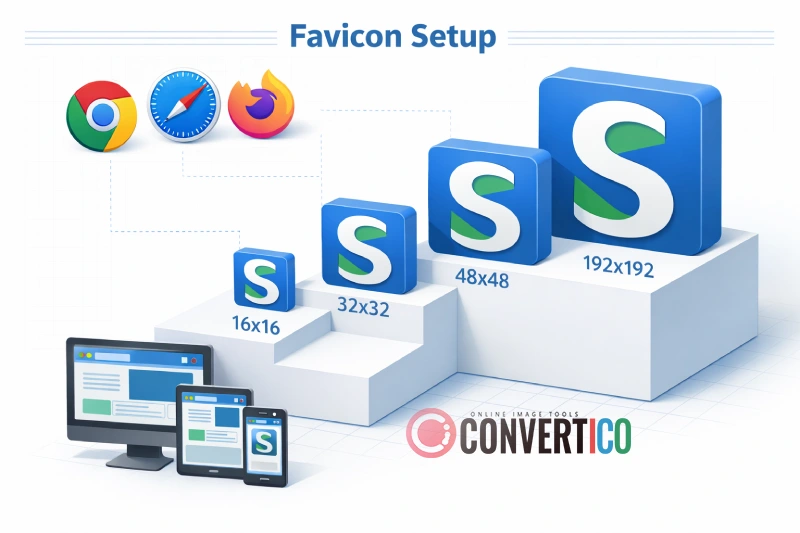
| Size | At least 8x8 px; bigger than 48x48 px recommended | Only a 16x16 icon - it looks blurry on high-density screens |
| Format | BMP, GIF, ICO, PNG, JPEG, PPM or TIFF | Only an SVG favicon (SVG is not on Google's list) |
| Crawling | Googlebot can crawl the home page; Googlebot-Image can crawl the icon | robots.txt blocks /wp-content/, /assets/ or images |
| URL | A stable address | A new cache-busting file name on every deploy |
| Content | Fits Google's policies | Adult or hateful imagery - Google swaps in a default icon |
| Scope | One favicon per hostname | Expecting example.com/shop to get its own icon |
Following every rule is not a guarantee. Google says so itself: a favicon may still not appear. But a site that breaks a rule almost never gets one.
Step 1: See What Google Sees
Start with facts, not guesses.
- Paste your home page address into the Favicon Checker. It reads your HTML, follows every icon link, checks the files, reads your robots.txt and reports what each problem means for Google.
- Open your home page, press Ctrl+U (Cmd+Option+U on a Mac) and search for
rel="icon". If it is not in the source, Google cannot see it. - Open the favicon address on its own in a new tab. It should show the icon - not a 404 page, a login page or a redirect to the home page.
Want to see how it will look in the results first? The Favicon Preview shows your icon in a mock Google result, browser tabs and bookmarks.
Check Your Favicon Against Google's Rules
Size, shape, format, robots.txt, apple-touch-icon and manifest - with the exact HTML fix.
Favicon CheckerStep 2: Fix the Favicon File
A correct file solves most cases.
- Make it square. Put a wide logo on a square canvas, or use just the symbol or the first letter.
- Make it big enough. A 48x48 px icon or larger (96x96 or 192x192 work well) stays sharp on every screen.
- Use a supported format. PNG or ICO is the safe choice. If you love your SVG favicon, keep it for browsers - but add a PNG or ICO as well.
- Keep it simple. Google shows it tiny, so thin lines and small text disappear. Check it with a plain light and a dark background.
The quickest way to get every file right is the Favicon Package Generator: one image in, all sizes plus the HTML out. You can also turn a logo into an icon with PNG to Favicon, SVG to Favicon or Image to ICO.
Is your ICO file really fine? An .ico file can hold several sizes, or only one tiny one. Drop it into the Icons Analyzer to see exactly which sizes are inside. Read what an ICO file is if the format is new to you.
Step 3: Fix the HTML Markup
Put the tags in the <head> of your home page, in the HTML the server sends - not added later by JavaScript.
<link rel="icon" href="/favicon.ico" sizes="48x48">
<link rel="icon" href="/favicon-96x96.png" type="image/png" sizes="96x96">
<link rel="icon" href="/favicon.svg" type="image/svg+xml">
<link rel="apple-touch-icon" href="/apple-touch-icon.png">
Google accepts the rel values icon, shortcut icon, apple-touch-icon and apple-touch-icon-precomposed. The href can be relative or point to a CDN, as long as Googlebot-Image can fetch it.
For the iPhone and Android home screen icons, see Favicon for Apple and Favicon for Android.
WordPress, Shopify and Wix
Do not paste tags into a theme file. Use the platform's own Site Icon or Favicon setting (in WordPress it sits under Settings - General in recent versions, or Appearance - Customize - Site Identity in classic themes; Shopify and Wix have it in their theme or site settings). Then check that only one set of icon tags ends up in the source - an old theme or SEO plugin can add a second, conflicting one.
Step 4: Let Google Crawl It
A perfect icon that Google cannot fetch never shows.
Open yoursite.com/robots.txt and look for rules that block the folder your icon lives in:
# Blocks favicons stored in WordPress uploads
User-agent: *
Disallow: /wp-content/

# Blocks Google's image crawler completely
User-agent: Googlebot-Image
Disallow: /
Remove the block, or add an Allow: line for the favicon file. Also check that:
- The favicon returns status 200, not 403, 404 or a redirect chain.
- Your firewall or bot protection (Cloudflare, Wordfence, a CDN rule) does not challenge Googlebot.
- The home page itself is not marked
noindexor blocked.
Not sure how robots.txt works on your site? The Webmaster Tools page collects checks for search engines, and a clean sitemap helps Google find your pages.
Step 5: Ask Google to Recrawl
- Open Google Search Console and use URL Inspection on your home page - not on the favicon file.
- Click Request indexing.
- Wait. Google says recrawling can take from several days to several weeks.
Requesting again and again does not speed it up. Keep the favicon URL the same while you wait - changing it restarts the clock.

Special Cases
| Situation | What happens | What to do |
|---|---|---|
| Subdomain (blog.example.com) | Treated as its own site | Give it its own home page and favicon tags |
| Subfolder (example.com/shop) | Uses the main site's favicon | Nothing - Google does not support a separate icon here |
| www and non-www | Google picks the version it indexes | Redirect one to the other so the icon is on the indexed one |
| You changed your favicon | The old one stays for a while | Keep the new URL stable and request indexing of the home page |
| Google shows a grey globe | No usable favicon found | Go through steps 1 to 4 |
| Google shows a wrong icon | It found another icon link, often from a plugin | Remove the extra icon tags |
Curious which favicon your site - or a competitor - used before? The Favicon History tool shows past versions from the Wayback Machine, and the Favicon Extractor downloads the current icons from any site.
Frequently Asked Questions
Why is my favicon not showing in Google?
Usually one of five things: the icon tag is not on the home page, the image is not square, the format is not supported (for example SVG only), robots.txt blocks the file or the home page, or Google simply has not recrawled yet. The Favicon Checker tests all of them.
How long does it take for a favicon to show in Google?
Google says crawling can take from several days to several weeks after you add or change it. Request indexing of the home page in Search Console, then keep the favicon URL stable while you wait.
What size should a favicon be for Google?
Square and at least 8x8 pixels, but Google recommends larger than 48x48 pixels. A 48x48 ICO plus a 96x96 or 192x192 PNG covers search, browsers and phones.
Does Google support SVG favicons?
SVG is not on Google's list of supported favicon formats (BMP, GIF, ICO, PNG, JPEG, PPM and TIFF). Browsers handle SVG well, so keep it if you like - but add a PNG or ICO as well for Google.
Should I request indexing for the favicon file?
No. Use URL Inspection on your home page and request indexing there. Google finds the favicon through the home page.
Can each page have its own favicon in Google?
No. Google shows one favicon per hostname. Subdomains can have their own; subfolders use the main site's icon.
Why does Google show a different icon than my browser?
Your browser may use a newer file from its cache or an SVG, while Google uses the last version it crawled, from a format it supports. Wait for the recrawl, and remove any old or duplicate icon tags.
Does a favicon help SEO?
Not as a ranking factor, but a clear icon makes your result easier to spot and recognise, which can help people choose it.
Still stuck? Ask us - we reply faster than a JPEG loads on dial-up.
The Bottom Line
- Icon tag on the home page, in the server HTML
- Square, 48x48 px or larger, PNG or ICO
- Nothing in robots.txt blocking the page or the icon
- Request indexing of the home page - then wait days to weeks
Choosing between formats? Read ICO vs SVG.
Find Out Why Your Favicon Is Missing
One check against all of Google's favicon rules - with the HTML fix to copy.
Favicon CheckerStill having trouble? Please contact us and we'll be happy to help!