The Short Answer
Use JPG for photos and PNG for everything with sharp edges - logos, screenshots, text and anything that needs a transparent background.
That one rule covers 90% of cases.
The rest comes down to file size, where the image is going, and whether a newer format like WebP would do the job better. We saved the same three images in every format to show you the real numbers below.
Already have the wrong format? Switch in seconds with PNG to JPG or JPG to PNG - free, and nothing to install.
PNG vs JPG at a Glance
| PNG | JPG / JPEG | |
|---|---|---|
| Compression | Lossless - every pixel kept | Lossy - fine detail thrown away |
| Best for | Logos, screenshots, text, graphics | Photos, scans, anything with soft gradients |
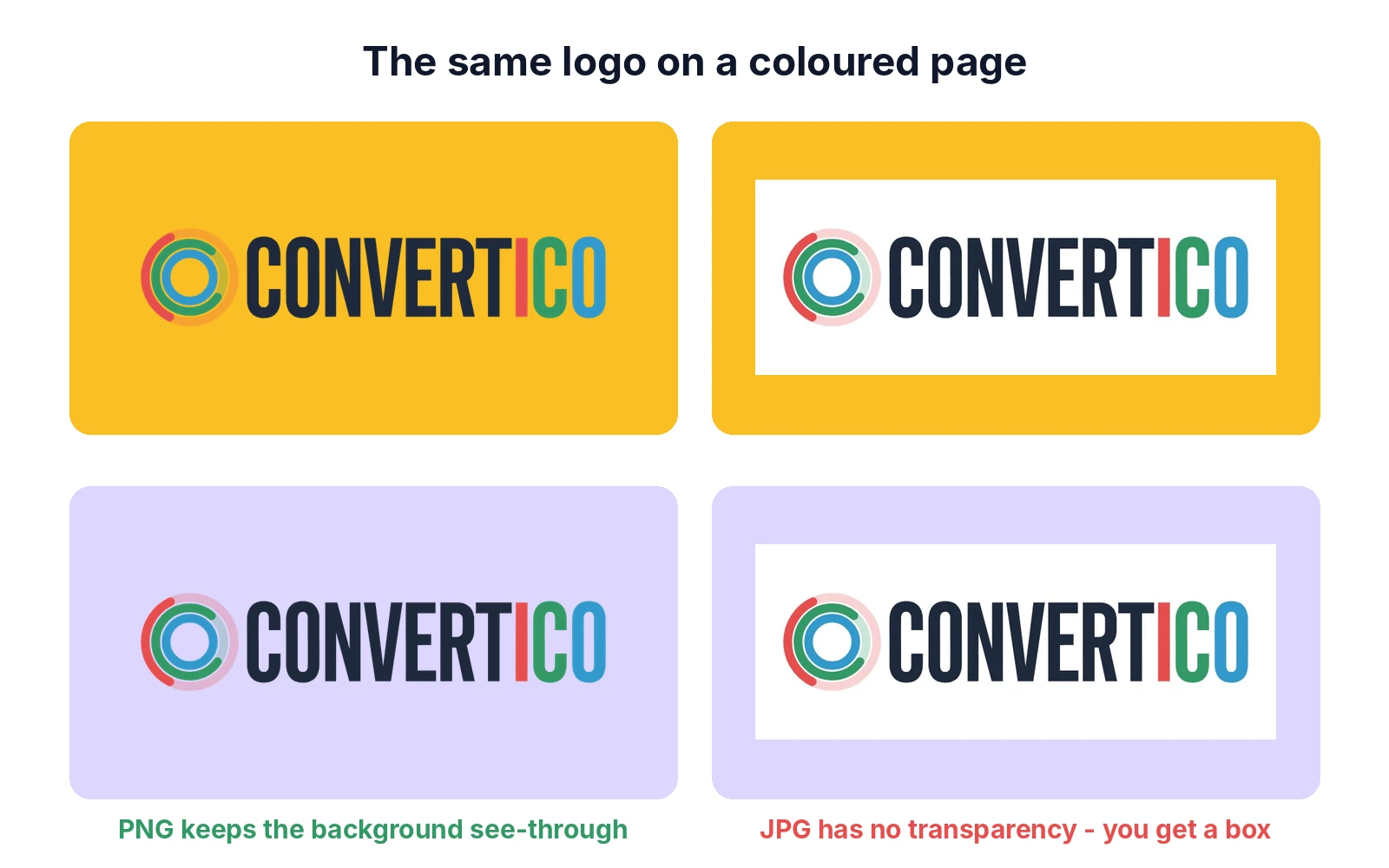
| Transparency | Yes, full alpha channel | No - transparent areas become a solid colour |
| File size, photos | 5-6x bigger | Small |
| File size, graphics | Small (PNG-8 even smaller) | Often bigger, and blurry |
| Re-saving | No quality loss, ever | Loses a little quality every save |
| Colour depth | 8 or 16 bits per channel | 8 bits per channel |
| Animation | Yes, as APNG | No |
| Works everywhere? | Yes | Yes |
Decide in 10 Seconds
- Does it need a transparent background? PNG.
- Does it have text, sharp lines or flat colours (logo, screenshot, chart, icon)? PNG.
- Is it a photo or something with natural light and texture? JPG.
Not sure what an image already is? The Image Format Detector reads the real format from the file itself, whatever the extension says.
Real File Sizes: We Tested It
Rules of thumb are easy to repeat, so we measured instead.
We saved three typical images - a photo, a screenshot and a logo - in every format with standard settings (libjpeg and zlib, the same engines most apps use).
A Photo (1400 x 815, city skyline)
| Format | File size | What you see |
|---|---|---|
| PNG (lossless) | 1.52 MB | Perfect - and 6x bigger than it needs to be |
| JPG quality 100 | 629 KB | Indistinguishable from the original |
| JPG quality 85 | 250 KB | Still looks identical - the sweet spot |
| JPG quality 60 | 141 KB | Fine on a phone, soft when you zoom in |
| PNG-8 (256 colours) | 592 KB | Visible banding in the sky - wrong tool |
| WebP quality 80 | 154 KB | Looks like JPG 85, 40% smaller |
| AVIF quality 60 | 113 KB | The smallest that still looks good |
A Screenshot (1400 x 900, an app page)
| Format | File size | What you see |
|---|---|---|
| PNG | 164 KB | Pixel-perfect text and icons |
| PNG-8 (256 colours) | 58 KB | Still pixel-perfect - UI rarely uses more colours |
| JPG quality 85 | 132 KB | Barely smaller, with smudges around the text |
| JPG quality 60 | 88 KB | Blocky halos around every letter |
| WebP lossless | 68 KB | Pixel-perfect, smaller than PNG |
A Logo (800 x 300, transparent background)
| Format | File size | What you see |
|---|---|---|
| PNG-32 (full transparency) | 29 KB | Perfect edges, sits on any background |
| PNG-8 (256 colours) | 8 KB | Looks the same here - logos use few colours |
| WebP lossless | 14 KB | Perfect, with transparency |
| JPG quality 85 | 22 KB | White box around it - no transparency |
The pattern: for photos, JPG is 5-6x smaller than PNG with no visible difference. For screenshots and logos, PNG (especially PNG-8) is smaller than JPG and sharper. The "PNG files are big" reputation only holds for photos.
What Is PNG?
PNG (Portable Network Graphics) appeared in 1996 as a patent-free replacement for GIF.
It uses lossless compression: the DEFLATE algorithm (the same one inside ZIP files) packs repeated patterns more tightly, but every pixel comes back exactly as it was. That is why PNG is perfect for flat colours and sharp edges - and wasteful for photos, where almost no two pixels repeat.
| Type | Colours | Transparency | Use it for |
|---|---|---|---|
| PNG-8 | Up to 256 | Yes (simple) | Icons, logos, screenshots, simple graphics |
| PNG-24 | 16.7 million | No | Detailed graphics without transparency |
| PNG-32 | 16.7 million | Yes, full alpha | Logos, cut-out product photos, anything see-through |
| PNG 48 / 64-bit | Trillions | Optional | Photo editing and HDR masters |
Most apps save PNG-24 or PNG-32 by default. If your graphic has few colours, the PNG to 8-bit converter or Compress PNG can cut the file by two thirds without any visible change.
PNG is still evolving: in 2025 the W3C published the third edition of the PNG standard, its first big update in over 20 years, which officially adds HDR and animated PNG (APNG).
What Is JPG (JPEG)?
JPEG, named after the Joint Photographic Experts Group, became a standard in 1992 and has been the format of digital photos ever since.
It uses lossy compression. JPG splits the image into 8 x 8 pixel blocks and throws away detail your eye is unlikely to notice - mostly fine colour variation, because we see brightness much better than colour.
On a photo, you cannot see what is missing. On text and hard edges, you can: the lost detail shows up as smudges and blocky halos.
JPG or JPEG? Same format. The three-letter .jpg comes from old Windows and DOS, which only allowed three-letter extensions. The full story, plus .jpe and .jfif: JPG, JPEG, JPE and JFIF explained.
JPG Quality Settings
| Quality | Use it for | From our photo test |
|---|---|---|
| 90-100 | Print, archives, a master copy | 283-629 KB |
| 80-89 | Websites and sharing - the sweet spot | 250 KB at 85 |
| 60-79 | Thumbnails, email previews | 141-211 KB |
| Below 60 | Only when size matters more than looks | Visible blocks |
Every time you open a JPG, edit it and save it again, it loses a little more - like a photocopy of a photocopy. Edit in PNG or your editor's own format, and export to JPG once, at the end.
Need a JPG under a certain size, say 200 KB for a form? Compress JPG finds the best quality for your target.
When to Use PNG

- Logos and brand marks - crisp edges and a transparent background, so the logo sits on any colour. Have the logo as SVG? Export exact sizes with SVG to PNG.
- Screenshots - text, icons and thin lines stay pixel-perfect, and the file is often smaller than a JPG.
- Anything transparent - stickers, product cut-outs, overlays, game sprites. Remove a background with the PNG Background Remover.
- Charts, diagrams and infographics - flat colours and text compress well and stay readable.
- Work in progress - re-save as often as you like with no quality loss, then export a JPG at the end.
- Icons and favicons - small, sharp and transparent.
When to Use JPG
- Photos - from your phone or camera, scans, product photos. JPG was built for them.
- Websites with lots of images - galleries, shops, blogs. Smaller files load faster, which helps both visitors and search rankings.
- Email and messaging - a 250 KB JPG instead of a 1.5 MB PNG of the same photo.
- Social media - most platforms turn uploads into JPG anyway. Uploading a well-made JPG at the right size gives you more control; the Instagram Post Resizer handles the size.
- Large backgrounds - hero images and textures without transparency.
Photos from an iPhone are often HEIC, which many websites and Windows apps refuse. Turn them into JPG with HEIC to JPG.
Why Text Looks Blurry in a JPG
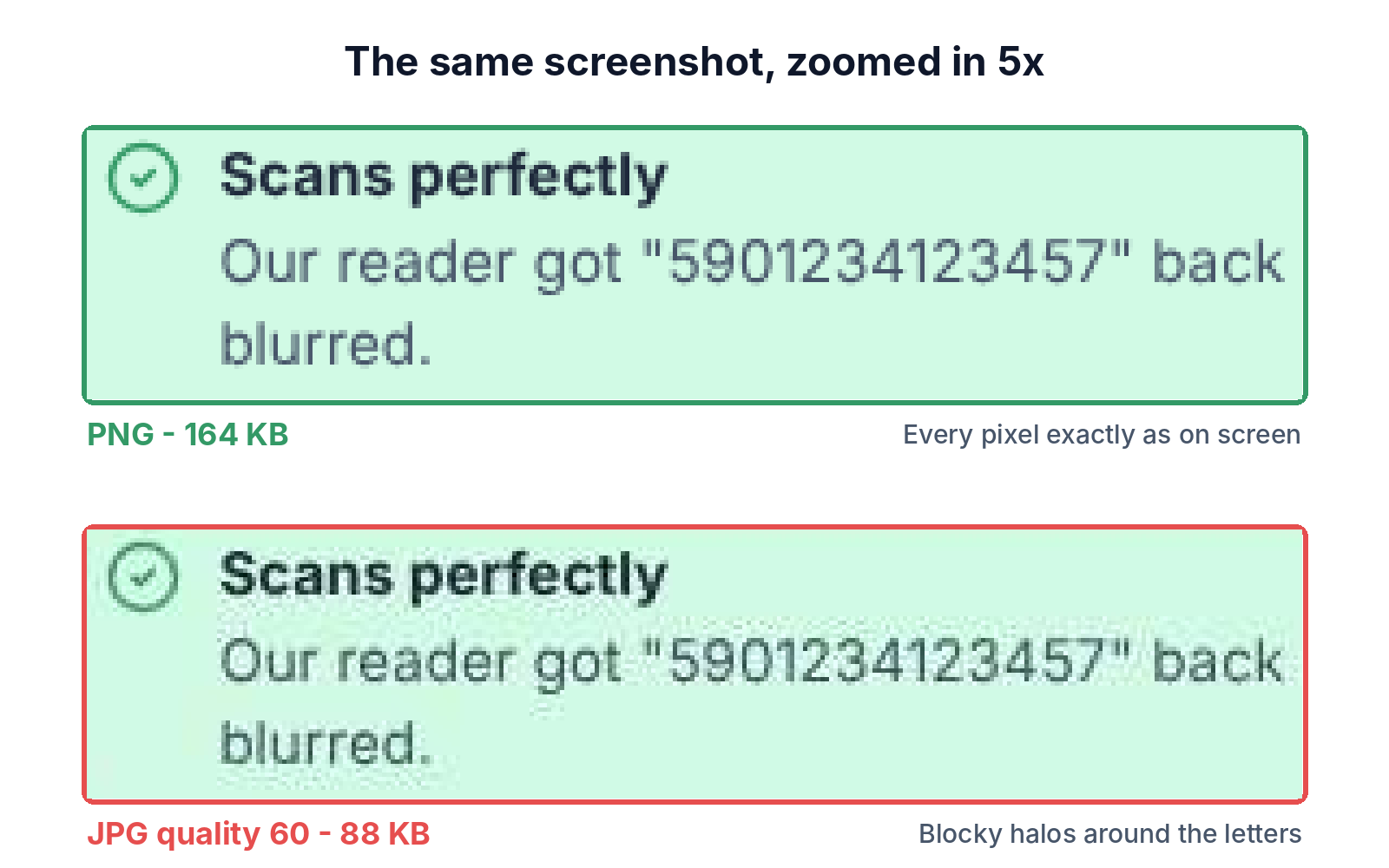
JPG smooths out sharp changes from dark to light - exactly what text, lines and icons are made of.
The result is "ringing": faint halos and 8 x 8 blocks around every letter.
In our test, the JPG screenshot at quality 85 was barely smaller than the PNG (132 KB vs 164 KB) and already smudged. At quality 60 it was full of blocks. The PNG-8 version beat both at 58 KB - with no blur at all.
Never save screenshots, logos or anything with text as JPG. It looks worse and is rarely smaller.
Converting Between PNG and JPG
PNG to JPG
- Check for transparency. JPG cannot store it, so transparent areas need a background colour - usually white.
- Pick quality 80-85 for the web, 90-95 for print.
- Keep the PNG. Going back from JPG will not bring the lost detail back.
The PNG to JPG converter lets you choose the background colour and quality, and converts a whole batch at once.
JPG to PNG
- Know what it fixes. PNG will not restore detail the JPG already lost - you get a bigger file that looks the same.
- Do it before editing, so further saves stop adding damage.
- Do it to add transparency - convert, then cut out the background.
Use JPG to PNG, then the PNG Background Remover if you need a see-through background.
What About WebP and AVIF?
Both newer formats beat PNG and JPG on size, and both support transparency.
In our tests, a WebP photo was almost 40% smaller than the JPG at similar quality, and a lossless WebP screenshot was 60% smaller than the PNG. AVIF went further: the photo came out at 113 KB, less than half the JPG.
| Where the image goes | Best choice | Why |
|---|---|---|
| Your own website | WebP or AVIF | Every current major browser shows both |
| Email attachments | JPG or PNG | Some mail apps still do not show WebP or AVIF |
| Word, PowerPoint, Google Docs | JPG or PNG | Universal support |
| Social media uploads | JPG (photos), PNG (graphics) | Platforms convert everything anyway |
| Print shop | High-quality JPG, PNG or PDF | What print software expects |
| Keeping a master copy | PNG or the original file | No generation loss |
Try them on your own images: PNG to WebP, JPG to WebP, JPG to AVIF and PNG to AVIF. Got a WebP that will not open somewhere? WebP to PNG fixes that.
Common Mistakes
- Logos saved as JPG. Fuzzy edges and a white box. Save logos as PNG or SVG - see vector files explained.
- Photos saved as PNG. 5-6x bigger for no visible gain. Use JPG at 80-85.
- Re-saving the same JPG again and again. Each save adds damage. Edit the original and export once.
- Quality 100 "to be safe". Our photo was 629 KB at 100 and 250 KB at 85, with no difference you can see.
- Converting JPG to PNG to "improve quality". It only makes the file bigger. To truly clean up a low-quality picture, see how to fix poor photo quality.
- Uploading huge images. A 4000 px photo on a page that shows 1200 px wastes data. Resize first with the Image Resizer, then compress - more in how to reduce image file size.
Convert PNG and JPG in Seconds
Free, no sign-up, batch conversion with quality and background control.
PNG to JPGFrequently Asked Questions
Is PNG better quality than JPG?
PNG keeps every pixel, so it never loses quality. But for photos, a JPG at quality 85 looks the same to the eye at a fraction of the size. For text and graphics, PNG really is visibly better.
Which is better for printing, PNG or JPG?
Both print well. Use a high-quality JPG (90-95) for photos and PNG for logos and graphics. Many print shops also accept PDF, and some ask for TIFF or CMYK files - check with them first.
Can a JPG have a transparent background?
No. JPG cannot store transparency. Convert it to PNG and remove the background, for example with the PNG Background Remover.
Why is my PNG so big?
It is probably a photo. PNG stores every pixel of a photo, so it ends up 5-6x bigger than a JPG. Convert photos to JPG, and for graphics try PNG-8 or Compress PNG.
Does converting JPG to PNG improve quality?
No. The detail lost when the JPG was made is gone. You get a bigger file that looks the same - though further edits will not add new damage.
Should I use PNG or JPG for my website?
JPG for photos and PNG for logos, icons and screenshots - or WebP or AVIF for both if you can, since every current major browser supports them and the files are much smaller.
Why does my transparent PNG show a black or white background?
The app you opened it in does not show transparency, or it was converted to JPG somewhere along the way. Open it in a browser to check; the transparency is usually still there.
Still stuck? Ask us - we reply faster than a JPEG loads on dial-up.
The Bottom Line
- Photos: JPG at quality 80-85
- Logos, screenshots, text and transparency: PNG
- For screenshots and logos, PNG is usually smaller than JPG, too
- Edit in PNG, export to JPG once
- Websites: WebP or AVIF beat both
Picked the wrong one? It takes ten seconds to fix.
Going the other way? Use JPG to PNG. Making files smaller? See all our image compressors.